准确来说 Containers 容器技术 是一种技术,而 docker 是该技术的一种实现
具体的实现有: Docker、Podman
容器不是虚拟机,它本质上是一个被隔离和限制的 Linux 进程。
容器原理
容器技术核心:Namespace + Cgroups + OverlayFS
1. Linux Namespace —— 资源隔离的基础
2. Cgroups —— 资源限制与管理
3. OverlayFS —— 分层文件系统
docker流程
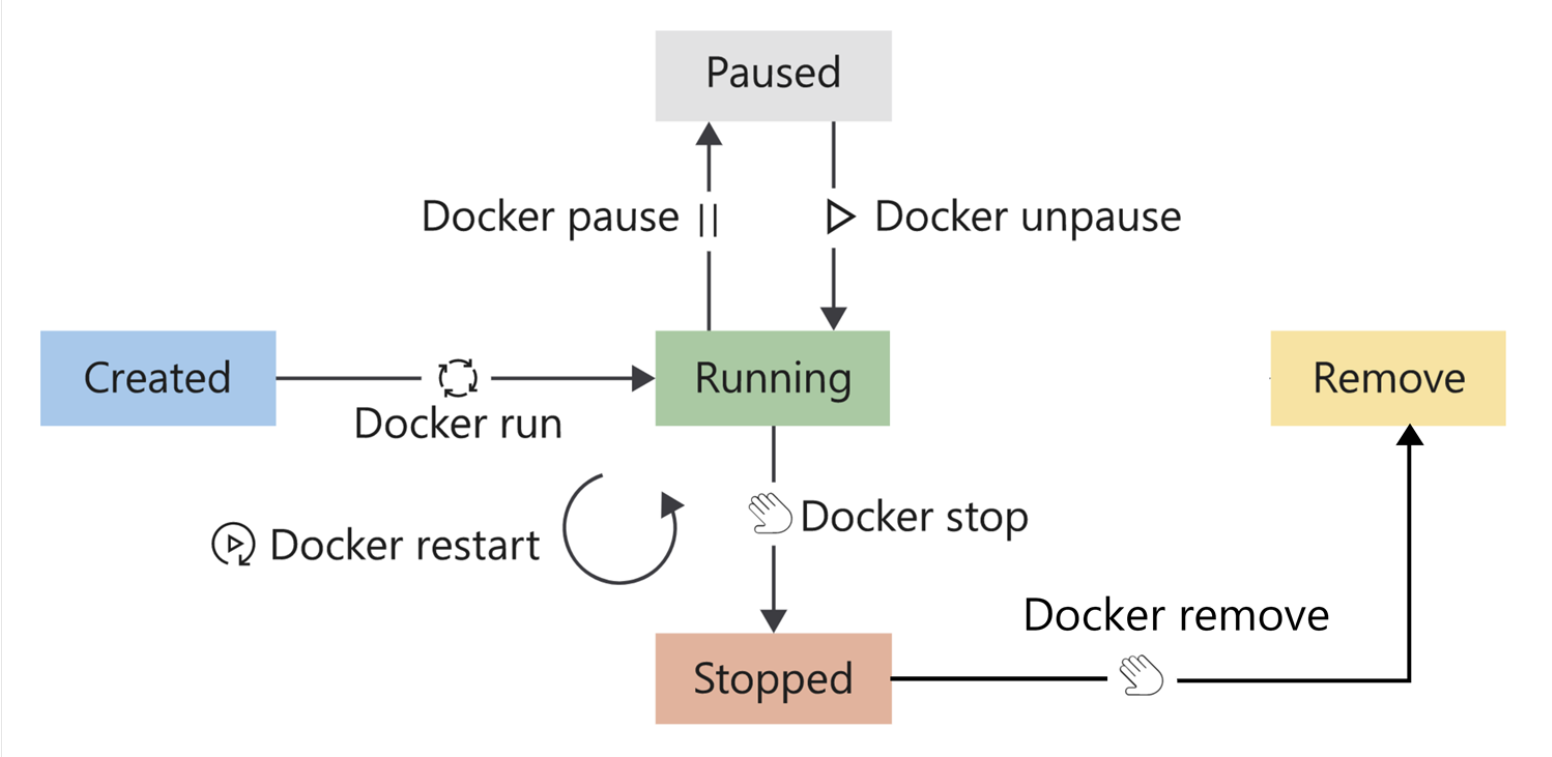
常用命令
docker run 相关参数
| 参数 | 作用 | 记忆 |
|---|---|---|
-d |
后台运行容器(detached) | d = daemon,后台运行 |
-it |
进入交互式终端 | i = input , t = tty (Teletypewriter) |
--name |
给容器自定义名称 | 取名 |
-p host:container |
端口映射,外部访问容器服务 | p = port |
-P |
自动映射随机端口 | P -> Por |
-v host:container |
数据卷挂载 | v = volume (存储) |
--rm |
退出后自动删除容器 | rm = remove image |
-e KEY=VALUE |
设置环境变量 | -e = environment |
--network <network> |
指定容器网络 | |
--restart=always |
容器异常退出后自动重启 | |
--entrypoint <cmd> |
替换镜像默认入口命令 | 换家门 |
--gpus all |
启动GPU(Nvidia环境) |
docker run --rm
docker build 相关参数
| 参数 | 作用 | 示例 | 记忆 |
|---|---|---|---|
-t 或 --tag |
给镜像命名(含版本标签) | docker build -t myapp:1.0 . |
tag = 给它贴名字 |
-f 或 --file |
指定 Dockerfile 文件路径 | docker build -f Dockerfile.dev . |
file = 指定文件 |
--build-arg |
传递构建参数(与 ARG 配合) |
docker build --build-arg ENV=prod . |
ARG = build 参数 |
-q 或 --quiet |
静默模式,仅输出镜像 ID | docker build -q . |
quiet = 安静构建 |
--no-cache |
不使用缓存,强制重新构建 | docker build --no-cache . |
no cache = 每步重新来 |
--pull |
始终拉取最新基础镜像 | docker build --pull . |
pull = 更新基础镜像 |
--platform |
指定目标平台(跨架构构建) | docker build --platform linux/arm64 . |
Mac 构建 Linux 跨平台 |
--target |
指定多阶段构建的阶段 | docker build --target prod . |
target = 构建到某阶段 |
--progress |
设置构建日志格式(plain / tty) | docker build --progress=plain . |
CI/CD 友好 |
--cache-from |
使用指定镜像缓存 | docker build --cache-from myapp:latest . |
复用旧构建,提高速度 |
--cache-to |
将缓存推送到远端(多用于 CI) | docker build --cache-to type=inline . |
和 cache-from配套 |
--network |
指定构建阶段网络模式 | docker build --network host . |
某些 apt/pip 镜像缺网时使用 |
编写Dockerfile
docker build
| 指令 | 作用 | 示例 |
|---|---|---|
| FROM | 指定基础镜像(必须第一行) | FROM ubuntu:22.04 |
| RUN | 执行命令(用于安装依赖、环境配置) | RUN apt-get update |
| CMD | 设置容器启动时执行的命令(可被 override) | CMD ["nginx", "-g", "daemon off;"] |
| ENTRYPOINT | 强制主命令(不被覆盖) | ENTRYPOINT ["python3"] |
| COPY | 把文件从主机复制到镜像 | COPY . /app |
| ADD | 同 COPY,但支持 URL 和解压 | ADD app.tar.gz /app |
| WORKDIR | 设置默认工作目录 | WORKDIR /app |
| ENV | 设置环境变量 | ENV APP_ENV=production |
| EXPOSE | 声明容器暴露端口(不等于 -p) |
EXPOSE 8080 |
| VOLUME | 声明挂载点 | VOLUME /data |
| USER | 指定运行镜像的用户 | USER node |
| ARG | 构建时传参数 | ARG VERSION=1.0 |
| LABEL | 添加镜像元数据(版本、维护者) | LABEL version="1.0" |
| HEALTHCHECK | 容器健康检查 | HEALTHCHECK CMD curl -f http://localhost/ |
| ONBUILD | 给继承者预定义 trigger | ONBUILD COPY . /app |
| SHELL | 指定构建执行 shell 类型 | SHELL ["/bin/bash", "-c"] |
- 案例
# 1. 使用官方 Python 镜像
FROM python:3.11-slim

# 2. 设置工作目录
WORKDIR /app

# 3. 安装 Python 依赖
COPY requirements.txt .
RUN pip install --no-cache-dir -r requirements.txt

# 4. 拷贝项目代码
COPY . .

# 5. 暴露端口(可选)
EXPOSE 8000

# 6. 运行应用(以 Flask 为例)
CMD ["python", "app.py"]
编写docker-compose
docker-compose 可以一键启动一堆服务
案例
version: "3.9"

services:
  web:
    image: nginx:latest
    ports:
      - "8080:80"
    volumes:
      - ./html:/usr/share/nginx/html
    depends_on:
      - app

  app:
    build: ./app
    container_name: my-python-app
    environment:
      - APP_ENV=prod
      - DEBUG=false
    volumes:
      - ./app:/app
    command: ["python", "app.py"]
    restart: unless-stopped